


Shake Shack
4.14.62K Reviews
App Specs
- Version
- 2.90.1
- Updated On
- License
- Free
- Downloads
- 1,000,000+
- Developer
- Shake Shack
- Categories
- Food & Drink
- Platform
- Android, iOS
Screenshots
 Analysis by AppCompare
I reach for the Shake Shack app when I already know I want a Shack meal and would rather sort out the order on my phone than decide at a busy counter. The main appeal is practical: it can help you avoid a line, check offers and challenges, and arrange delivery where that option is available. It is a focused Food & Drink app from Shake Shack, not a general restaurant finder, so its usefulness depends on whether the chain fits the meal you have in mind.
What to expect from the ordering flow
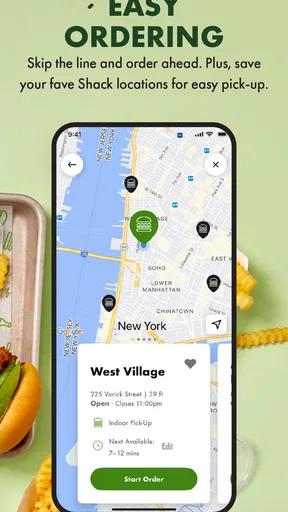
The app’s strongest case is a familiar one: browse the menu, make choices, and complete an order without having to hold up a queue while you work out what everyone wants. That can make a rushed lunch feel less hectic, especially if you are ordering for more than one person. I would still treat the app as a way to prepare and submit an order, not as a guarantee that every part of a busy restaurant visit will be instant. Kitchen pace, pickup arrangements, and the crowd at a particular location can all affect the real wait.
A useful habit is to look through the menu before you reach the counter area or leave work. You can check the options, settle on any changes, and avoid making choices under pressure. For a group, I would agree on the order first and then enter it carefully; a phone screen is convenient, but it is easy to overlook a modifier when several meals are involved. Review the basket before paying, particularly if you have made several adjustments.
Offers and challenges are best treated as extras
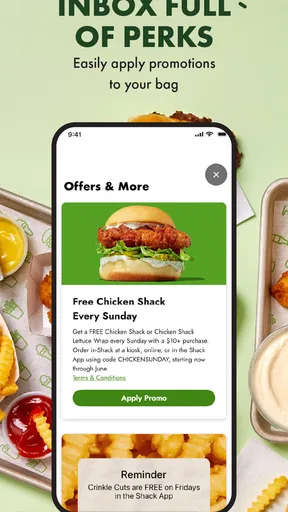
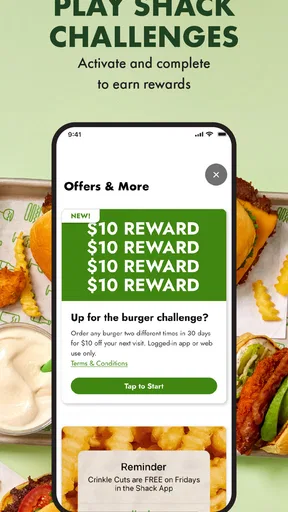
Offers and challenges give the app something to do beyond placing an order, but I would not make them the reason to install it unless you already visit Shake Shack. They can add a little incentive to a planned meal, yet the better decision is still to choose food you actually want. A promotion is only useful if it suits your plans and the location or order you are making; it should not push you into an extra trip or a larger order you did not want.
For a repeat customer, checking the app before deciding where to eat is a sensible workflow. It lets you see whether there is an offer worth considering before you commit, rather than assuming one will apply automatically at checkout. Challenges may also make a routine visit feel more engaging, though I would see them as light extras rather than a reason to expect a deep game or a substantial rewards system.
When delivery makes sense—and when it does not
Delivery is handy when you want Shake Shack food at home or at work and do not want to make a separate pickup trip. It is also the most convenient choice when your schedule is tight but you can plan around the delivery process. I would compare the final order details with what you need before confirming, and keep in mind that delivery is not the same as a fast-food pickup: distance, local availability, and the handoff all shape how convenient it feels.
If you are already close to a Shack and have a short break, pickup may suit you better than waiting for a delivery. If you are choosing among several nearby restaurants, a general delivery app can be more useful because it puts different cuisines and restaurants in one place. The Shake Shack app earns its place when you have already settled on this particular menu, rather than when you are still deciding what kind of food you want.
Worth Reading Before You Choose

EA SPORTS FC Mobile 26 Is a Bigger Football Game, but It Takes Time

Flipboard Shows What News Apps Must Do Beyond the Feed

Switching to Android Auto Means Rethinking Your Driving Routine

Google Calendar Makes a Crowded Week Easier to Manage

Ludo King Makes the Most of the Minutes Between Plans

Baby Panda World Brings Quick Play to Modern Phones, but Its Game Library Feels Busy
A realistic use case: a crowded lunch break
Imagine you have a limited lunch break and a nearby Shack is a likely choice. I would open the app before leaving, check the menu, decide on the meal, and place the order only after confirming the location and pickup plan. That reduces time spent choosing in a line, but it does not remove the need to travel to the restaurant or collect the food. If the location is packed or your break is extremely short, ordering ahead may not solve the timing problem; choosing something closer or quicker to collect could be the wiser call.
For a family or a few colleagues, the same preparation has another benefit: everyone can settle their preferences before the order is submitted. The trade-off is that one person becomes responsible for checking the full basket, so I would have the group confirm customizations and quantities before payment. That small pause is more useful than rushing through checkout and discovering a missing change after the order is placed.
The First Bite: Getting Started with the App
Downloading the Shake Shack app was a breeze. Available on both Android and iOS, it's a quick tap away from your smartphone. Once installed, the app greets you with a clean and inviting interface that screams "modern diner chic." The layout is intuitive, which is a big plus when you're hangry and need your burger fix fast.
After a speedy sign-up process, you're welcomed into the Shake Shack universe. The app offers a neat feature where you can find the nearest Shack location. Handy, right? Especially when you're in unfamiliar territory and the craving hits hard.
Ordering Made Easy
Now, onto the main event: ordering. The app lets you explore the menu just like you would in a real Shack, minus the line. You’ve got your ShackBurgers, crinkle-cut fries, and those drool-worthy shakes all laid out beautifully. It’s like flipping through a digital menu, but better because you don't have to awkwardly lean over someone’s shoulder to see it.
Customization is key, and Shake Shack knows it. Don’t want pickles? Easy, just tap them away. Extra cheese? Go for it. The ability to tailor your order is seamless, and the app remembers your dietary preferences for next time.
The Checkout Experience
Once your order is set, the checkout process is straightforward. The app supports multiple payment options—credit card, Apple Pay, and Google Pay. I opted for Apple Pay, and it was a smooth transaction. No fumbling with cash or cards, just a simple tap and go.
One delightful addition is the option to add a tip for the hardworking Shake Shack crew. It’s a nice touch, especially when you know someone is putting together your meal with care.
Picking Up Your Order
After placing your order, the app updates you on its status. You’ll know exactly when your food is ready, which makes planning around your pick-up time super convenient. No more waiting around wondering if your fries are getting cold.
The pick-up process is quick and efficient. A simple walk to the designated pick-up area, show your order number, and voilà, your meal is in hand. The app’s integration with the in-store service is seamless, making the experience as smooth as a perfectly blended Shack shake.
Extra Features Worth Mentioning
The app also packs a few extra features that enhance the overall experience. For instance, the "Shack Cam" lets you peek into some locations through live video, adding a touch of fun and anticipation.
Loyalty rewards are another highlight. Every purchase gets you closer to free goodies, which is a great incentive to keep coming back. Who doesn’t love a free shake or burger now and then?
Lastly, the app keeps you in the loop with notifications about new menu items or special promotions. It’s like having a little Shake Shack buddy keeping you updated on all things delicious.
Reliability, device fit, and practical limits
In my view, the app’s reliability matters most at the moment of checkout: you want to know what you selected and where the order is meant to go. Before submitting, I would pause to verify the location, pickup or delivery choice, and any customizations. That quick review is a good safeguard whenever you are ordering on a small screen, particularly if you are hungry or multitasking.
If the app feels slow or an order screen does not behave as expected, I would avoid tapping the payment button repeatedly. First check whether the order appears in the app and whether you received a confirmation, then decide whether you need to try again. Repeating a payment action without checking can create uncertainty about whether an order was submitted. I also would not rely on a status screen as a substitute for following the restaurant’s pickup instructions.
The app is free, and its audience rating is 4.1 from around 17,000 ratings, with more than 1 million installs. Those figures suggest it has found a sizeable audience, but they do not tell me how it will perform on every phone or at every location. The current version is 2.85.0, and the minimum operating-system requirement is version 9. On an older device, I would check compatibility before planning a meal around mobile ordering; on a supported phone, the app is still only one part of the restaurant experience, not a way to control local kitchen conditions.
Because this is a dedicated restaurant app rather than a broad food-ordering marketplace, it is most worthwhile when Shake Shack is already on your shortlist. A general restaurant or delivery app is the better tool if you want to compare several places, browse a wider range of cuisines, or see multiple options in one checkout environment. In contrast, this app keeps the experience centered on Shake Shack and its own menu, which can be simpler when that is exactly what you want.
Who will get the most out of it
I would recommend it to regular customers, people who like to plan a pickup before arriving, and anyone who wants to check for app offers while deciding whether to order. It may also suit someone new to an area who wants to locate a nearby Shack before setting out. The app is less compelling for someone who visits only once, prefers to choose from many restaurants, or would rather order face to face and ask questions as they go.
It is also not the right shortcut if your main need is certainty about an unusually tight schedule. Ordering ahead can reduce time spent deciding or waiting in a line, but it cannot promise that the meal will be ready at the exact moment you arrive. If timing is critical, build in room for the trip and pickup, or choose a meal option with a more predictable fit for your schedule.
Final Thoughts
Overall, the Shake Shack app delivers a satisfying digital experience that mirrors the delight of visiting an actual Shack. It’s user-friendly, efficient, and packed with features that make ordering a breeze. Whether you’re a Shake Shack newbie or a seasoned fan, this app is a must-have for anyone who loves good food without the hassle.
So, next time you’re in the mood for a ShackBurger and don’t want to deal with the lines, give the app a whirl. Your taste buds—and your time—will thank you.
My more measured verdict is that it is a useful companion to a Shake Shack visit, not a reason by itself to choose one. The Food & Drink app is rated for Everyone and is free to install, so trying it costs nothing upfront; its value comes from whether its ordering flow, location lookup, and occasional extras fit your habits. If you already know what you want, it can make planning easier. If you are comparing restaurants or need a guaranteed fast meal, another approach may serve you better.
Pros
- User-friendly interface for easy navigation.
- Fast delivery with real-time tracking.
- Customizable orders to suit preferences.
- Loyalty rewards program for frequent users.
- Secure payment options for peace of mind.
Cons
- Limited menu compared to in-store options.
- Occasional app crashes reported by users.
- Delivery service not available in all areas.
- Requires stable internet for optimal use.
- Notifications can sometimes be overwhelming.
FAQs for Shake Shack
What is the Shake Shack app used for?
The Shake Shack app is designed to enhance your dining experience by allowing you to order food directly from your mobile device. You can customize your order, select your preferred pickup location, and even schedule when you want your meal ready. It’s perfect for avoiding long lines and ensuring a seamless ordering process.
Is the Shake Shack app free to download and use?
Yes, the Shake Shack app is free to download on both Android and iOS devices. While the app itself doesn’t require any purchase, you will need to pay for any food or drink orders you make through it. There are no hidden fees associated with the app, making it a convenient tool for Shake Shack fans.
Can I earn rewards or loyalty points with the Shake Shack app?
Currently, the Shake Shack app does not offer a traditional rewards or loyalty points system. However, users can often find exclusive promotions and offers available through the app. It’s a good idea to check regularly for any new deals or discounts that may enhance your dining experience.
How secure is my personal information on the Shake Shack app?
The Shake Shack app prioritizes user security by using encryption to protect your personal and payment information. It’s recommended to keep your app and device updated to the latest versions to ensure the highest level of security. Always use a strong, unique password for your account.
What devices are compatible with the Shake Shack app?
The Shake Shack app is compatible with most modern Android and iOS devices. It requires iOS 11.0 or later for Apple devices, and Android 5.0 or later for Android devices. Ensure your device meets these requirements before downloading to avoid compatibility issues.


